Guide 2 of 3 — Reading Ocean Data
Reading Edges, Shapes, and Movement (Why Fish Care)
In the first article we talked about what chlorophyll and water clarity are. Now we get into why fish actually respond to them — and this mostly comes down to edges, shapes, and how those features move over time.
Fish don't live in averages. They live on boundaries.
Anytime two different water masses meet — warm/cold, clean/dirty, green/blue — you create an edge. That edge concentrates life. Bait stacks there because plankton stacks there. Predators follow because feeding is efficient. This is why edges consistently outproduce "nice looking water" with no structure.
But not all edges are equal.
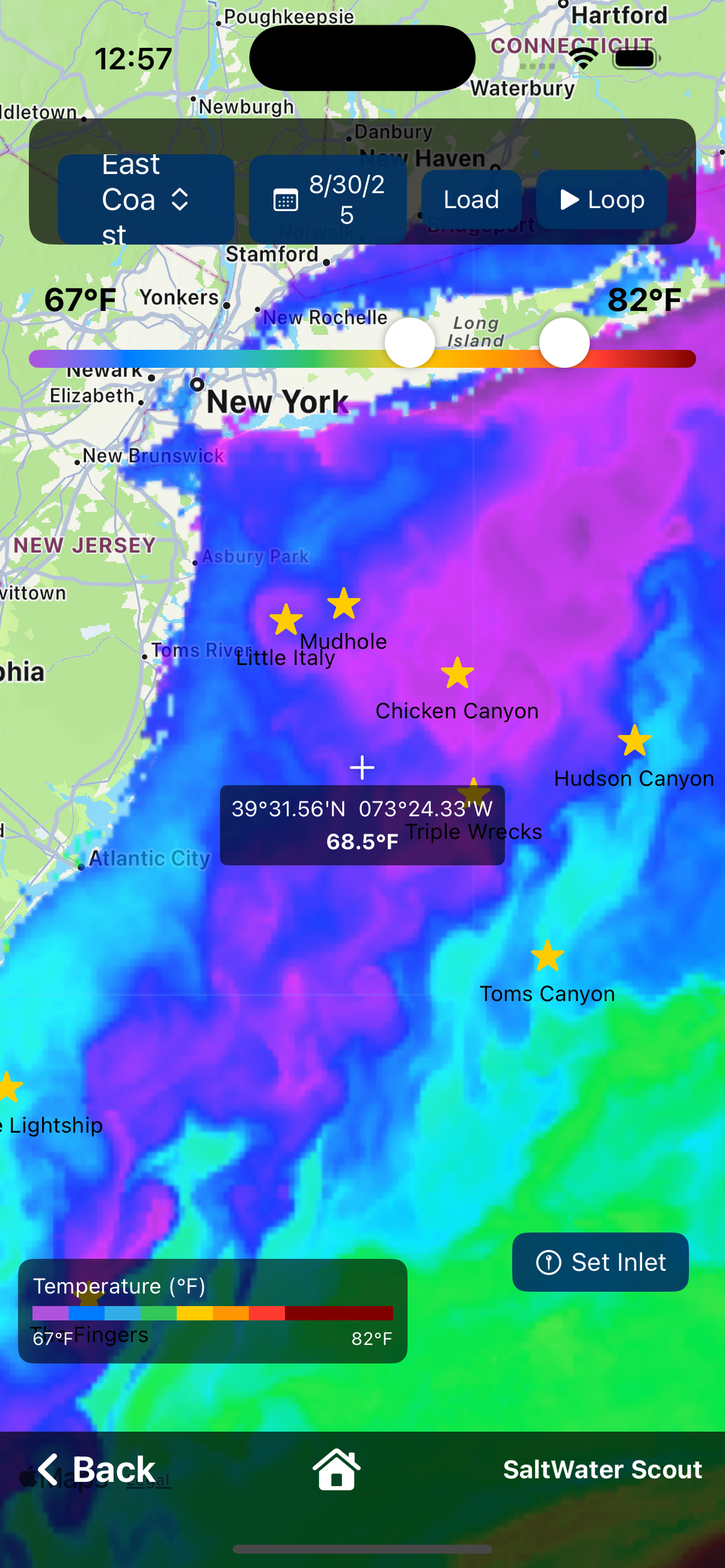
Straight Lines vs Broken, Irregular Edges
A long, straight temperature or color line usually means stable, uniform flow. These can hold fish, but they're often travel lanes. Fish move along them.
Broken edges, curved lines, fingers, and scalloped shapes are far more important. These shapes tell you the water is interacting — currents folding, pushing, and pinching water together. That interaction creates micro-upwellings, eddies and slack zones, and areas where bait gets trapped instead of swept away.
Fish prefer these areas because they can feed without burning energy. If you see a jagged edge with points, hooks, or pockets, that's not noise — that's structure.
Corners, Pinch Points, and Hooks
Any time an edge bends sharply or narrows, think of it like a point or rip. Water speeds up on one side, slows on the other. Bait piles up on the slow side. Predators set up just outside it.
This is especially true when SST edges line up with chlorophyll or clarity changes. When multiple layers agree, that's confirmation — not coincidence.
Why Movement Matters More Than a Single Image
A static chart is a snapshot. Fish respond to trends. That's why the play button matters. Also make sure you adjust the temp range bar to tighten up the ranges to see more clear temp breaks.
When you play the last 5 days in SaltWater Scout, you're not just watching water move — you're watching pressure and opportunity shift. Ask yourself:
- Is this edge tightening or stretching?
- Is it drifting north/south or holding in place?
- Did a break form suddenly after wind or a front?
- Is clean water pushing into dirty water, or the opposite?
Edges that hold their shape for days are far more reliable than ones that appear overnight and disappear the next morning. Consistency equals bait staying put. Bait staying put equals predators settling in.
Following the Edge, Not Chasing Yesterday
A common mistake is running to yesterday's numbers. The play button shows you whether you should run to an area, slide along an edge, or stay home because everything is scattered.
If the entire system is moving offshore or down-current, yesterday's waypoint is already dead. If the edge is slowly rotating or tightening, that's a setup — not a warning.
Why Raw (Non Cloud-Corrected) SST Comes First
Always start with non cloud-corrected SST. Raw satellite data preserves sharp thermal boundaries, small-scale structure, and real edges created by current interaction.
Cloud-corrected SST fills gaps using models. That's useful when cloud cover is heavy, but the modeling process often smooths gradients — and gradients are exactly what we're trying to find. If you're looking for detail, smoothing works against you.
Use cloud-corrected SST when needed — but not as your first look.
In the next article we'll put it all together — how SST, chlorophyll, clarity, currents, and even bottom features work as one system. Read Part 3: Putting It All Together. Or download SaltWater Scout free and try the Ocean Data layers yourself.